




It is a digital audio workstation it was developed by adobe. It is used for audio recording, mixing, editing, and mastering. It was first released in 2003 as Cool Edit Pro and was later rebranded as Adobe Audition.





Features of Adobe Audio Editor/ Adobe Audition
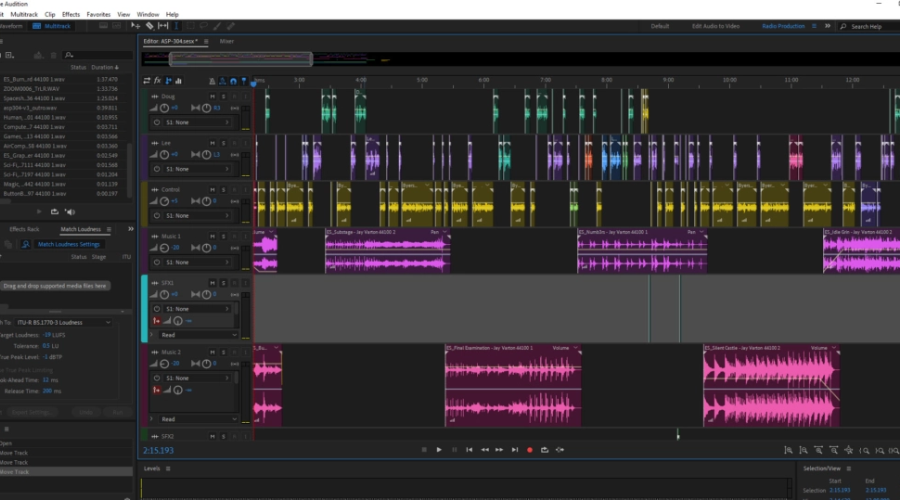
Here are certain features of Adobe audition:
Multi-track editing: Adobe Audition allows you to record, edit, and mix multiple tracks simultaneously. This makes it ideal for recording and editing music, podcasts, and audio for video.
Audio restoration: Adobe Audition includes a variety of adobe audio editor tools for cleaning up and restoring audio recordings. These include noise reduction, hum removal, and click and pop removal. It can help in adobe audio editor .
Effects: Adobe audio editor includes a wide range of effects, such as EQ, compression, reverb, and delay. These can be used to enhance and shape the sound of your recordings.
Automation: Adobe Audio editor allows you to automate various parameters of your audio, such as volume and panning. This makes it easy to create dynamic and professional-sounding mixes.
Time-stretching and pitch-shifting: Adobe Audio editor includes tools for changing the tempo and pitch of your recordings. This can be used to match the tempo of different tracks or to change the key of a recording.
Markers and regions: Adobe Audio editor allows you to set markers and regions within your audio recordings. This makes it easy to navigate and edit your recordings.
Spectral editing: Adobe Audio editor includes a powerful spectral editing tool, which allows you to make precise edits to specific frequencies in your recordings.
Batch processing: Adobe Audition allows you to process multiple files at once, using the same effects and settings. This is useful for applying the same processing to multiple tracks or recordings.
Video support: Adobe Audition includes support for video files, allowing you to synch audio with video and create soundtracks for videos.
Integration with other Adobe software: Adobe Audition can be integrated with other Adobe software, such as Adobe Premiere Pro, making it easy to transfer audio between different applications.
Adobe Sound Editor

Adobe Soundbooth is a powerful adobe audio editor software that allows you to create, edit, mix, and master audio. It combines an intuitive user interface with powerful editing tools, effects, and filters. You can layer multiple audio elements, edit existing audio files, and mix music and sound effects to create a professional-sounding audio production. With Soundbooth, you can adjust the volume, pan, and pitch of audio clips, apply effects such as reverb and EQ, and use the built-in spectral analysis tools to analyze and edit sound. Additionally, the software features voice synthesis, allowing you to create natural-sounding synthetic vocalizations.
Adobe Audition Pros Cons
Adobe Audition is a professional Adobe audio editor software that is widely used in the film, television, and music industries. Some pros of Adobe Audition include:
-Powerful editing tools: Adobe Audition offers a wide range of tools for editing audio, including Adobe noise reduction, equalization, and pitch correction.
-Multitrack editing: The software allows users to work with multiple audio tracks, making it ideal for editing complex audio projects.
-Integration with other Adobe software: Adobe Audition can be easily integrated with other Adobe software, such as Adobe Premiere Pro, allowing for seamless audio and video editing.
-Comprehensive file support: Adobe Audition supports a wide range of file formats, including WAV, AIFF, MP3, and more.
Some cons of Adobe Audition include:
High cost: Adobe Audition is a paid software and can be quite expensive for some users.
Steep learning curve: The software has a lot of features, which can make it difficult for new users to learn and navigate.
System requirements: Adobe Audition requires a powerful computer with a fast processor and a lot of RAM to run smoothly.
Overall, Adobe Audition is a powerful and comprehensive Adobe audio editing software that is well-suited for professional audio editors and music producers. However, it may be too expensive or complex for some users.
Audio Edit in Adobe Audition

Editing audio in Adobe Audition can be done using a variety of tools and techniques. Here is a basic oversight of the process:
-Open Adobe Audition and create a new session or open an existing audio file.
-Use the waveform display to visually identify any areas of the audio that need to be edited.
-Use the selection tool to select the area of audio you wish to edit.
-Use the editing tools to make changes to the selected audio. Some of the majority of common tools include:
-Amplitude and compression: Used to adjust the overall volume of the audio.
-Equalization: Used to adjust the balance of different frequencies in the audio.
-Noise reduction: Used to reduce background noise in the audio.
-Time and pitch: Used to adjust the speed and pitch of the audio.
-Use the multitrack editing feature to layer multiple audio tracks and make adjustments to them individually.
-Use the effects to enhance the audio, such as reverb, delay, and chorus.
-Use the file export to save your edited audio in the desired format.
-Repeat the process as necessary for additional audio files.
Also, read- Decorate Your Home With The Best Artificial Trees
Conclusion
In conclusion, Adobe Audition is a powerful and professional Adobe audio editor software that offers a wide range of tools and features for editing audio. It is widely used in the film, television, and music industries and can be easily integrated with other Adobe software. However, it can be quite expensive, has a steep learning curve, and requires a powerful computer to run smoothly. It’s a great option for professional audio editors and music producers but may not be the best choice for casual users or those on a budget. You can find out more on feed hour. For more such blogs, visit Feedhour.